Trusted by More Than 400 Government Organizations
Government organizations use NEOGOV to maintain consistent workforce policies, document employee acknowledgements, and maintain defensible records that support policy administration across departments, locations, and employee groups.
NEOGOV Policy is used by over 400 government organizations across state, county, city, local, and tribal governments, supporting more than 1 million public-sector employees.
-
 Instead of wading through 50+ pages to find legal updates, employees use a side-by-side comparison that highlights changes, providing tremendous time savings for the staff.
-
 Revise workforce policies 4x faster, helping HR teams move policy updates through review and approval with less manual coordination and get current information to employees sooner.
-
 Save policy administrators 10-20 hours per week by reducing the manual work required to manage policy reviews, updates, acknowledgements, and documentation across departments.

Why Government Organizations Choose NEOGOV
- Designed around the realities of government HR and workforce administration
- More than 25 years serving government HR teams and public-sector organizations
- Integrated with the broader NEOGOV workforce management ecosystem
- Supports workforce policy management from onboarding through employment
Managing Workforce Policies Across Government Is More Difficult Than It Should Be
Personnel policies, employee handbooks, administrative procedures, and workforce requirements often live in different systems, departments, and file locations. As government organizations grow, maintaining policy consistency, documenting employee acknowledgements, and keeping policy records current becomes increasingly difficult.
- Multiple Versions Create Confusion
Policies stored across shared drives, email attachments, and department folders make it difficult for employees to know which version is current, increasing the risk of inconsistent policy application across departments. - Employee Acknowledgements Are Difficult to Track
Many government organizations still rely on spreadsheets, paper sign-off sheets, or manual follow-up to document policy distribution and employee review. - Policy Reviews Become Inconsistent
Without structured review processes, important workforce policies may remain outdated or receive inconsistent oversight across departments, creating gaps in policy accountability and documentation. - Producing Policy Records Takes Too Long
Preparing records for audits, investigations, grievances, public records requests, or compliance reviews often requires searching through multiple systems.
Workforce policies and procedures are only effective when employees can easily locate and reference the most current approved version when needed.
Manage the Entire Workforce Policy Lifecycle
Government organizations struggling with outdated policy processes often face challenges with policy distribution, employee acknowledgements, and maintaining consistent policy records across departments.
NEOGOV Policy helps government organizations manage workforce policies from creation through acknowledgement while maintaining policy consistency, employee accountability, and documented records.
- One Approved Version of Every Policy
Store personnel policies, employee handbooks, administrative procedures, workplace guidelines, and supporting documents in a centralized repository. - Structured Review and Approval Workflows
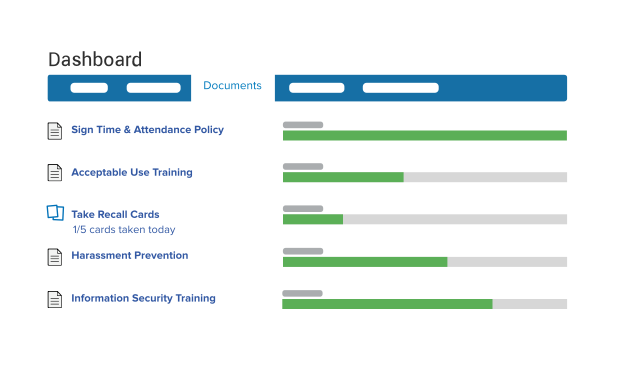
Route policies through review and approval processes that create visibility and accountability before publication. - Employee Acknowledgement Tracking
Distribute policies electronically and maintain documented records showing who reviewed and acknowledged required updates. - Workforce Policy History and Version Control
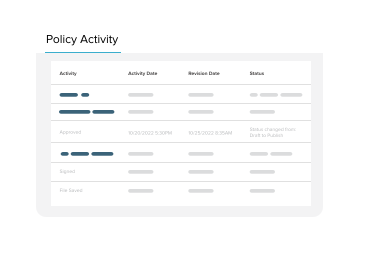
Maintain complete policy version history and highlight changes between versions so employees can understand updates while HR maintains one approved version of every workforce policy. - Documentation for Audits and Review
Access reports and policy records that help support audits, investigations, grievances, compliance reviews, and public records requests without reconstructing documentation from multiple systems.
From Policy Distribution to Employee Acknowledgement
- Create or Update Workforce Policies
HR teams and policy administrators create new policies or revise existing documents while maintaining version history and one approved version of every policy. - Route Policies Through Review
Policies move through structured approval workflows involving HR, administrators, legal teams, and department leaders to document reviews and maintain accountability before publication. - Publish and Distribute Updates
Approved policies are distributed electronically to the appropriate employee groups, helping ensure employees receive current policy updates and required communications. - Track Employee Acknowledgements
Employees review policies and acknowledge updates while administrators monitor completion status and outstanding actions, creating documented records of policy distribution and acknowledgement. - Access Documentation When Needed
Generate policy reports, acknowledgement records, and document histories to support reviews, audits, investigations, public records requests, and workforce compliance activities.
Features Designed for Government Workforce Policy Management
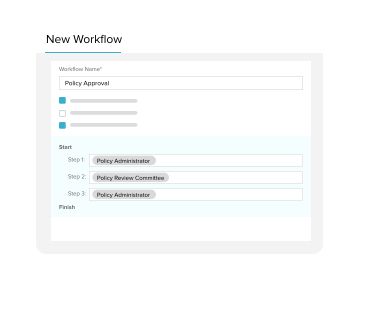
- Scheduled Policy Reviews and Approval Workflows
Schedule recurring policy reviews, automate reminders, and route documents through structured approval processes to maintain policy consistency and to document every review consistently across departments. - Side-by-Side Policy Comparisons
Compare revisions with highlighted changes so employees and reviewers can quickly understand policy updates and make more informed acknowledgements before acknowledging new policy versions. - Centralized Policy Repository
Store personnel policies, employee handbooks, forms, and supporting documents in one location while maintaining one approved version of every workforce policy item. - Policy AI Search
Find answers to workforce policy questions using AI grounded in your organization's approved policy documents with citations and links to verify information, while protecting sensitive data and maintaining role-based permissions without using content for public model training. - Employee Acknowledgement Tracking
Track acknowledgements with documented records tied to specific policy versions, creating defensible records showing when employees reviewed and acknowledged policy updates. - Role-Based Access Controls
Control access to policies and documents by role, department, or user group, ensuring employees see appropriate information while administrators maintain security and control over sensitive workforce content. - Mobile Policy Access
Allow employees to review policies and complete acknowledgements from approved devices and locations, improving workforce access to current policies without paper-based distribution. - Automated Notifications
Notify employees when policies are updated or require acknowledgement, helping departments communicate changes consistently while reducing manual follow-up. - Analytics and Compliance Reporting
Monitor acknowledgements, completion rates, workflow status, and policy activity through dashboards and reports that provide documentation needed for audits, investigations, and compliance reviews.
Consistent Policy Management Supports Better Government Operations
- Improve Workforce Consistency
Provide employees with access to the same approved policies and procedures regardless of department or work location, helping promote more consistent policy application across the organization. - Create Defensible Workforce Records
Maintain documentation showing when policies were distributed, reviewed, and acknowledged, making it easier to demonstrate consistent policy administration when records are requested or decisions are reviewed. Documented policy acknowledgements can also help organizations respond more confidently to audits, employee grievances, and wrongful termination claims. - Support Audits and Investigations
Access policy records, acknowledgement histories, and document activity from one system without searching through shared drives, paper files, or email archives when questions arise. - Give HR Teams More Capacity
Spend less time tracking acknowledgements, managing spreadsheets, and compiling documentation manually so HR teams can focus on workforce support instead of policy administration. - Strengthen Workforce Accountability
Provide visibility into policy acknowledgements and outstanding employee actions, helping departments follow up on required policy reviews more consistently. - Improve Employee Access to Information
Help employees quickly locate current approved workforce policies, procedures, and supporting documents.
How the City of Henderson Improved Policy Management
Government organizations often struggle to maintain one approved version of workforce policies, document employee acknowledgements, and quickly access policy records when questions arise.
-

The Challenge
- Multiple versions of workforce policies stored in different locations
- Manual acknowledgement tracking
- Limited visibility into employee policy completion
- Time-consuming audit and investigation preparation
- Difficulty demonstrating that policies were communicated consistently
-

The Solution
NEOGOV Policy centralizes policy management, employee acknowledgements, policy version history, and reporting so government organizations can manage policy revisions, document employee acknowledgements, and maintain the current approved version of every policy. -

The Result
The City of Henderson's HR team replaced a manual policy review process that required coordinating feedback from multiple stakeholders and consolidating numerous document versions. Using automated workflows and electronic acknowledgements, the team now manages policy reviews more efficiently, keeps collaborators working from the same approved version, and maintains documented employee acknowledgements to support personnel decisions.
Mimi Merhi, HR Programs Coordinator, City of Henderson, Nevada
Connect Policy Management Across Workforce Operations
- Learning and Training Management
Through integration with Learn, government organizations can connect policies directly to employee training. NEOGOV’s Learning and Training Management System for Government helps employees review required policies and complete related learning activities while maintaining documented training and policy records. - Policy Reinforcement and Knowledge Retention
Convert policy content into personalized microlearning experiences that help employees retain important policy information over time. As policy training software, Recall generates personalized learning from approved Policy documents only and does not use customer data or policy content to train public AI models. - Standards and Compliance Management
Connect policies and supporting documentation to organizational standards, regulatory requirements, and compliance frameworks, helping maintain organized evidence, documentation, and audit-ready supporting records. As accreditation management software, Standards helps government organizations document compliance by connecting policies, supporting evidence, and related documentation to accrediting body requirements, making it easier to prepare for compliance audits and accreditation reviews.
Support Accountability, Documentation, and Secure Access
Policy helps government organizations maintain secure access to workforce policies while supporting controlled access, documented policy activity, and workforce recordkeeping requirements.
- Role-Based Access Controls
Control access to policies, folders, and administrative functions based on employee roles and responsibilities. - Complete Policy History
Maintain records of revisions, approvals, acknowledgements, and policy activity to support audits and policy reviews. - Secure Cloud-Based Access
Provide authorized users with access to current policies and documentation from approved locations. - Accessibility Support
Support workforce accessibility requirements and employee access needs. - Audit-Ready Documentation
Maintain policy version history and acknowledgement records that support audits, reviews, investigations, and documentation requirements. - Records Retention Support
Maintain documentation to support workforce recordkeeping and applicable retention requirements.